
Base64 Is Fast Now, Actually
This is a short post.
I was wondering recently, if I had to send a binary file across a text stream to a browser - i.e., embedded in JSON - what would be the fastest way to do that.
Clearly, base64'ing the content is a valid approach and always has a 4/3 overhead.
However, one thought I had is that JS strings are fundamentally just arrays of unsigned 16-bit integers (or []uint16, if you're writing lots of Go, like me).
So we can actually just convert any kind of data to a JS string and then encode it again as UTF-8 without risk of loss.
The Thesis
What we do is basically take a Uint8Array ("native bytes"), reinterpret it as a Uint16Array, then convert it to a JS string.
The code looks a bit like:
function encode(raw: Uint8Array): string {
  const u16 = new Uint16Array(raw);
  const s = new TextDecoder('utf-16le').decode(u16);
  return JSON.stringify(s);
}
…this actually doesn't work for two reasons:
-
our data might have an odd number of bytes
-
TextDecoderactually generatesU+FFFDfor bad data, which random binary data will have - it's not actually string data.
Both can be solved - in Node, using Buffer, and in the browser using a few hacks.
The Results
Here is a table of all the results (for a single encode/decode round-trip in ms, but tests run 100s of times). I used an audio file of about 1.4mb, and a zipped version of the same file (~600k).
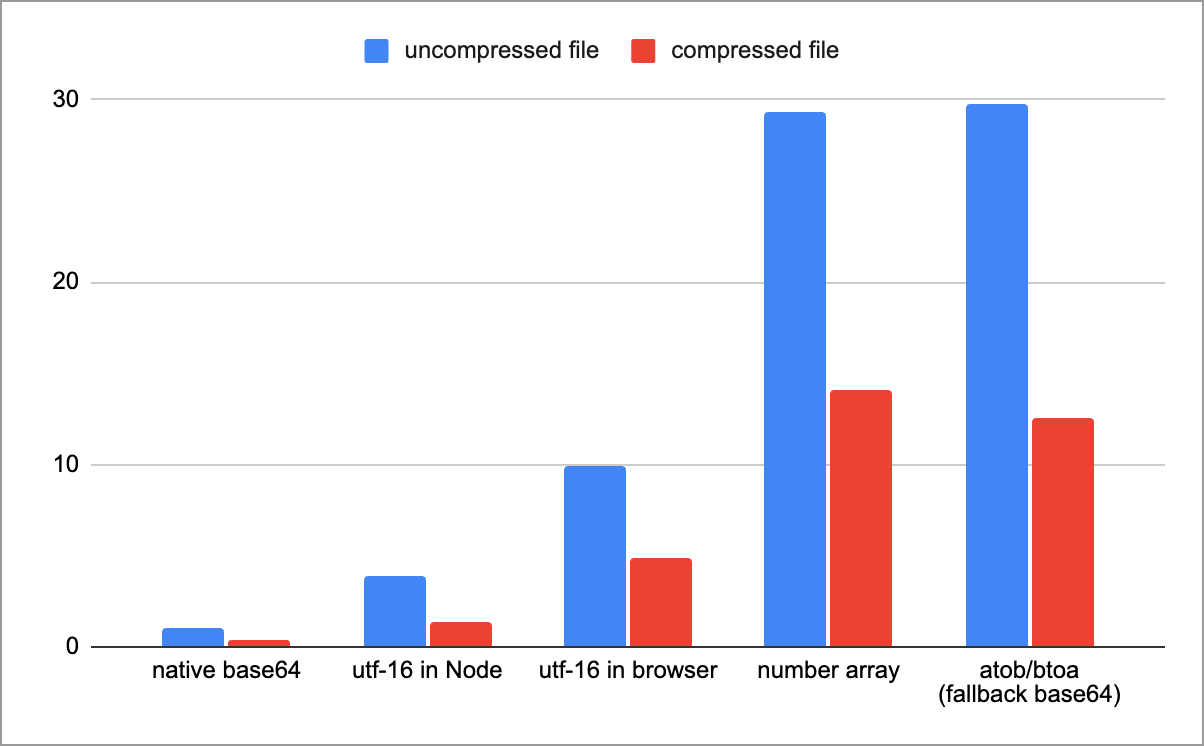
base64 is stupidly fastSo: native base64 is stupidly fast. But encoding via UTF-16 string isn't far behind.
To explain the options:
-
native base64: this is
fromBase64and friends, available in Node and all browsers from September 2025 -
utf-16 in Node: this is the above technique, using
Buffer -
utf-16 in browser: we can't use
Bufferin the browser, so we have to useTextDecoderwith a few hacks -
number array: a baseline of literally converting a
Uint8Arraytonumber[]and encoding/decoding it (e.g.,[123,0,3,1,255,...]) -
atob/btoa: the 'classic' way of doing base64. This is slow because it has to round-trip through as JS string which contains values 0-255. Most polyfills use this approach.
The code to generate this data is here.
Analysis
The UTF-16 approach is interesting, and remarkably fast. It generates a totally valid string, a random excerpt looks like:
"…弼並于忒퍛孾븭䍗伐뾠䫼藸왬愣邲틫違纝牿\udf00왻星멝ꟁ郧葓놹쑘澓燕㺪枢궅᧧澵춢呪垦ൢួ醝⠷銗䇎\udd2c흅蝗퍾慙瘝\udc9d縱쯙꾵\udeef篙䶄Ḛ煩忌떵䵺업\ude9f輫\udcdc㾺뤻촸㯆孟\udcb9뉺捸蜹躯액ꌀ瑍幘㕢譎뉛ᡦḝ萿힓ܞꪾඞ䣾闧忓槢\udf8e⭖㹠❎⁼ﷳ봝霗טּ棭\ud8dfጚ᭲ꄝ졷憢뙡뷪憓ä䧻弱ᘋᢃ䘶ر哤樹Ꮴ䮙ᔾᎻꩮꐱ趫\ud875摁狃渣ᅝ쿮꣖곷㰰뗊뼥ꎝ\udbcfﴞᮽ轺稯올熽䝂鏅᧵눎ᐋ퉖鋲\udaee쉼⇅뾠奰᳨詻닞굉\ud82dϓ綋놼☳뎭㳉趽畵ꨨ恫ꬬ洕ꈞ㨷鮊ꨋጦ渚陾翿䂼콦爧섺樼ඓ浧乖\ud872༗ḻ࿀徚ꟽ\udfa1疋庨㼖븖⦊…"
But it's also not any smaller than base64. For the two files, the UTF-16 approach is 173% and 154% of the original size, respectively.
Remember, what we're doing is:
- taking a
Uint8Array - reading it as a JS string via
Uint16Array - encoding each code point (or surrogate pair) as UTF-8, so it's valid JSON.
But part of the issue is that most data here ends up having no valid representation in UTF-8, so it ends up being escaped - that's the \udc9d and friends we see above.
And yes, we could start inventing our own binary formats… but that's not the point, the theory is that this must still be valid JSON.
Whereas, base64 is consistently 4/3, or 133% the size of the original.
So What?
This article has a pretty clear outcome, which was literally in the title.
You should probably encode data using the native base64 methods. They're really fast and consistent.
For users on old Chrome, - provide a polyfill maybe for the next year or so, which will be slower, but basically penalize them for not upgrading.
Thanks for reading! 🕺